

Connecting an Environment to apps
You decide which external apps your Environment reaches. Agents in that Environment act wherever the sign-ins on its Machine reach. An Organization can switch Composio off for its Environments; beyond that, Lazurio enforces nothing centrally. Before you connect the first app, read what you accept and check what is available today.
An Environment is the place where agents work for you. It can run on your own computer or be hosted as a Personal, Work or Team Environment. The Machine is the computer or virtual machine under an Environment. The user is the person for whom and with whom agents work, and who controls the Environment and the agents that run there. An Integration is an app or service connected to an Environment. The rules on this page apply to every kind of Environment.
The model in one paragraph
Section titled “The model in one paragraph”The lazurio command and Apps (called Launchpad in the sources) use the same
core. They manage the Environment’s tools and prepare agent instructions. Codex,
Claude Code, gh, Composio and other tools are command-line programs installed
and signed in on the Machine. If you work across several Organizations, the same
Environment can serve them. Agents work there with full access: whatever the
Environment allows, they may do, without a sandbox or approval of single
commands. If you need narrower rights or separate contexts, create another
Environment and sign in other accounts there.
Which path an app takes
Section titled “Which path an app takes”Every Integration has exactly one path. Every Environment requires GitHub CLI
gh.
- Its own tool from Settings → Tools, such as
ghfor GitHub orwaclifor WhatsApp. - Directly through Executor, the Environment’s MCP gateway. Lazurio installs and runs it, and it answers only on localhost. An app goes this way where its official MCP server is just as easy, or where it is a company app your Organization set up.
- Through Composio, with your own Composio account, where your Organization allows it.
Agents use them in that order, and every agent and bot of the Environment gets all of them. An app that is already connected keeps its path. Where an Environment has no Executor, as on your own computer today, an app takes the next path.
Agents never connect an Integration themselves, because signing in is your consent. They send you a link to its card in Apps → Integrations. A custom MCP server goes into the Environment’s Executor, and only on your explicit instruction.
A company app is a choice for the whole Organization, and it then connects directly. Today that is Microsoft 365, which Lazurio supports since release v0.1.9. Its setting goes into the Organization’s repository by a reviewed pull request, because editing it in Organization overview is decided, not yet deployed. See Microsoft 365 for IT and the Organization Admin. Google Workspace as a company app is decided and not implemented yet, so Google apps take the paths above.
For a connection Apps → Integrations does not offer, the Lazurio integration standard proposes this order. The first route that works wins, and you have the last word:
- the provider’s official MCP server, remote or self-hosted, added to Executor;
- the provider’s official CLI;
- Composio, when the provider has no suitable official MCP server or CLI and Composio is allowed;
- a reviewed open-source MCP server or CLI, pinned to an exact release or commit, with a verified publisher and licence;
- the browser, under your supervision, when none of the above exists.
Never allowed, at any step: scraping a website, reusing browser cookie sessions, shared brokers other than Composio, keys or tokens in a chat, Git or a log, and new ChatGPT or claude.ai connectors.
The rule. Agents do not use the ChatGPT apps, plugins and connectors their harness offers, unless the Organization, or you on a Personal Environment, allows them, and then only for apps outside Integrations. Agents get this rule in the Folder instructions. The Organization’s switch for it is decided, not yet deployed.
What Lazurio does technically. Where they are not allowed, Lazurio adds two settings of its own to Codex’s configuration in a Remote Environment: apps off by default, and no suggestions of plugins. That is a safeguard, not a guarantee:
- An app that the configuration enables by name stays on. Lazurio reports it as an exception.
- A configuration Lazurio cannot read or does not support, such as a file that does not parse, stays as it is and is reported.
- Where the apps are allowed, Lazurio takes its settings back.
- It covers only Codex in a Remote Environment. Lazurio never changes your own computer, where a connector may keep running.
To see the real state, look at the foot of Apps → Integrations → All, which warns
where the apps are not allowed and Codex still has them. For IT and agents,
lazurio integrations chatgpt-apps prints the same.
The tool catalog
Section titled “The tool catalog”The catalog lists the tools that agents can be told to use. Each has a tier and a setup mode.
| Tool | Command | Tier | Setup mode |
|---|---|---|---|
| GitHub CLI | gh | Required: always on, cannot be turned off | Launchpad |
| Executor | executor | Required; offered in a Remote Environment on Linux | Lazurio’s own setup |
| Composio | composio | Recommended | Launchpad |
| Bitwarden CLI | bw | Recommended; offered in a Remote Environment on Linux | Its own flow |
| wacli | wacli | Optional | Launchpad |
| gogcli | gog | Optional; offered on a computer and in a personal Remote Environment, not in a work one | Agent |
| Neon CLI | neon | Optional | Agent |
- Launchpad setup has a curated installation and sign-in, both in the Launchpad and on the command line. See connecting a tool.
- Agent setup gives you a prepared prompt. You copy it into a new agent chat; the agent installs the tool and guides your sign-in.
Each catalog entry tells the agent how the installed tool should be set up. If the prepared installation fails, Lazurio offers a prompt to finish it with an agent. A tool the Environment does not offer is left out of the agents’ instructions and cannot be turned on.
On an Organization’s Environment the Organization’s settings take precedence. Where they do not allow Composio, agents do not use it, whatever you chose: Settings → Tools shows its switch locked off and offers neither adding nor signing in.
Connecting a tool
Section titled “Connecting a tool”Open Settings → Tools in the Launchpad. Each tool has a row with its real name, one sentence on what it is for and its state: Connected as an account, or Not connected. The row offers one action:
- Add and connect when the tool is not installed yet;
- Connect when it is installed but not signed in;
- Link SSH key when
ghis signed in but the Machine’s key is not linked; - Disconnect when it is signed in;
- Connect with an agent for a tool an agent sets up.
For IT and agents, the same flow runs on the command line with
lazurio tools install <tool>, lazurio tools login <tool> and
lazurio tools logout <tool>.
The installation is for the current user, without administrator rights, from the tool’s official source; Composio comes as Lazurio’s own build of its CLI. A tool that already works is left as it is. You never copy an API key, and you can finish the sign-in on any device:
ghshows a one-time code and the GitHub device page. Open the page and enter the code. Lazurio then links the Machine’s SSH key to your account.composioshows a link. Open it and sign in. An Organization’s Environment then works in the Composio organization named after that Organization: Lazurio selects it itself and, where it does not exist yet, shows the one step that creates it. A Personal Environment uses the account’s default organization, which you choose at sign-in.waclishows a QR code to scan in WhatsApp, or pairs with your phone number instead.
Disconnecting gh or composio forgets the sign-in on this Machine only. If
the access must end at the provider too, revoke it there. Disconnecting wacli
unlinks the device. Every sign-in on a Machine can be ended on its own.
The curated flows run on Linux and macOS. On Windows they are refused and the prepared agent prompt is offered instead.
What “Used by agents” does
Section titled “What “Used by agents” does”Each row has a switch, Used by agents. A tool you connect in the Launchpad
turns it on, so agents can use the tool right away; you can turn it off again.
For IT and agents, the switch on the command line is lazurio tools enable and
lazurio tools disable.
A tool that is used by agents is written into the agent instructions of the Lazurio Folder on that Machine. The Lazurio Folder is the directory whose generated instructions and manual agents read when they start. Executor manages MCP servers and exposes them to agents. Where an Environment does not run Executor, agents use the MCP servers available in their client.
The switch changes agent instructions. It does not grant access, install a tool, sign in an account or pin a version. Turning it off removes the tool from the instructions. It does not sign you out or disconnect any app: to remove access, disconnect the app in Apps → Integrations or disconnect the tool.
You can add a short note to a tool that agents use, for example “read-only for customer mail”, under the tool’s details. Agents read it in the Folder manual. The note instructs agents but does not technically restrict access. Turning the tool off removes its note.
Connecting an app
Section titled “Connecting an app”-
Decide which Environment you connect. Organization rules apply in Work and Team Environments; you decide in a Personal Environment.
-
Open Apps → Integrations and find the app. An agent can send you the link to its card.
-
Choose Connect. If the app goes through Composio and Composio is not signed in yet, you sign in to Composio first.
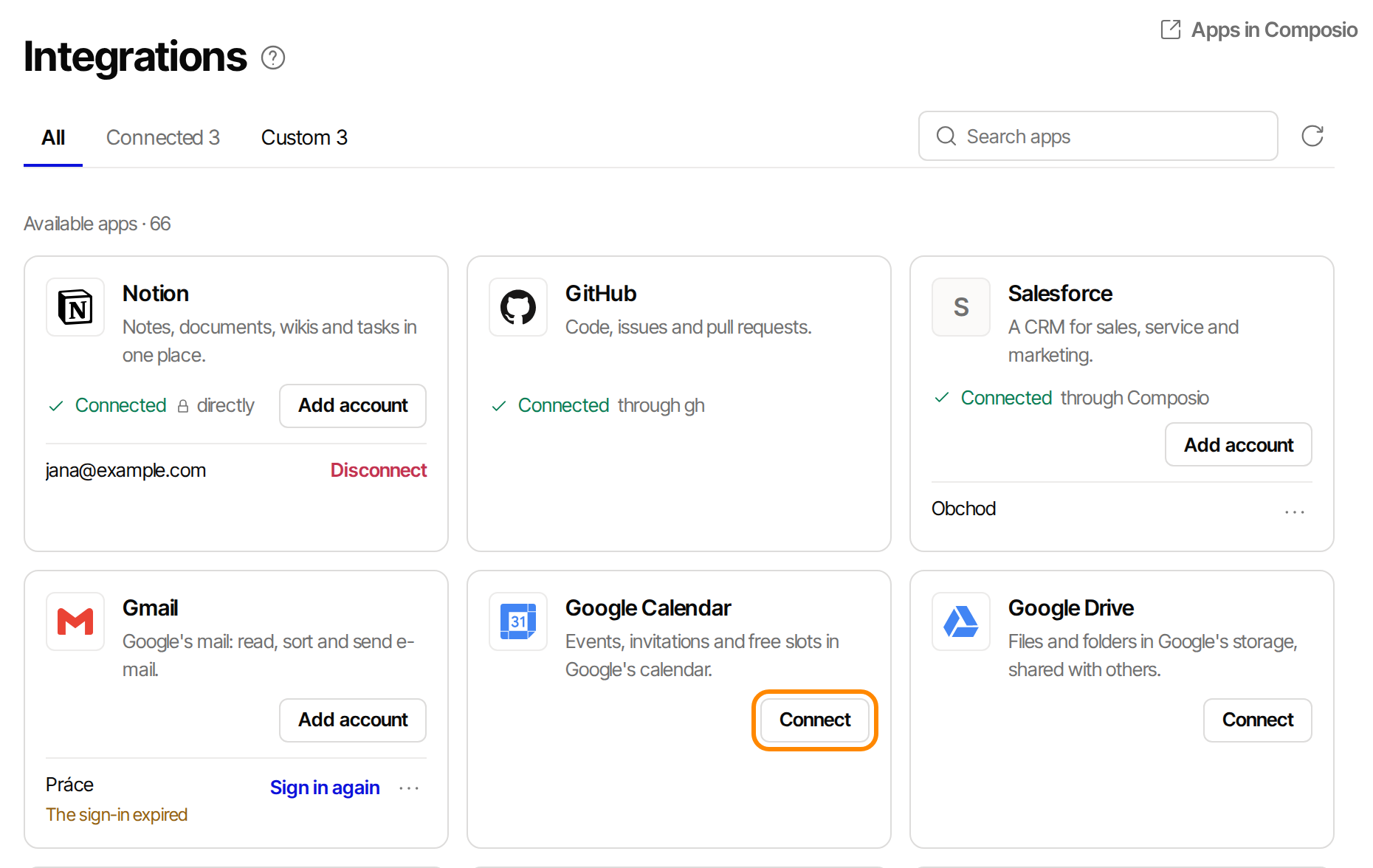
Each card shows the app's path. The accounts in the picture are examples. -
Sign in directly at the app, with the account agents should use.
-
Confirm on the card that the intended account is connected.
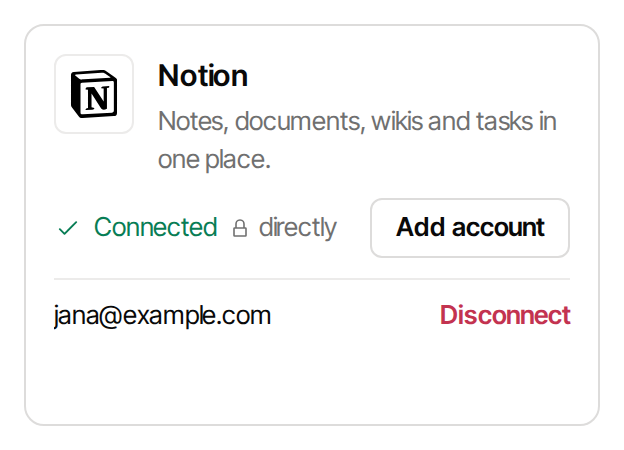
A connected app shows its path and its account. -
If agents should not have all of the app, narrow the connection before you hand them work.
Lesson 6 of the course explains the tabs and what agents may do with a connected app, and Connect your tools walks through common connections.
The account of the Environment
Section titled “The account of the Environment”A connection made through Composio belongs to the Composio account and its organization, not to a Machine. Two Environments signed in with the same account and the same Composio organization share their connections. That follows from Composio’s documentation and the source of its CLI, checked on 2026-10-07 without a live run. Do not treat a separate Machine as isolation of connected accounts. Use a separate Composio account when access must differ.
Team Environments
Section titled “Team Environments”A Team Remote Environment is shared by the members of a Team, so the accounts signed in there belong to the whole Environment. Every Team member and every agent there can use them.
- GitHub. A Team Environment works in GitHub through the Organization’s GitHub App, Lazurio for GitHub. Personal GitHub accounts are not signed in there.
- Composio. A Team Environment signs in with the Team’s Composio account, never with a person’s own.
- Other apps. Sign in only team accounts, such as a shared mailbox or calendar, that everyone in the Team may use. Connect personal accounts in your own Environment. The Launchpad warns about this before a sign-in, and an agent asks which team account to connect before it connects an app.
Guidance for Organization Admins
Section titled “Guidance for Organization Admins”Beyond the Organization’s settings, Lazurio does not enforce or monitor how a user connects an Environment.
- Organization settings. Whether Composio is allowed is a setting of the Organization. Where it says no, no app of its Environments goes through Composio.
- Composio accounts and organizations. Each user signs in with their own Composio account, and works in a Composio organization of their own named after the Lazurio Organization, with nobody else in it. A Team Environment uses a team account. Lazurio holds no Composio organization key and creates no shared Composio organizations. Names help select the right connection; verify actual access with the provider.
- Integrations the whole Organization shares go into the Organization’s tracked integration catalog, through a reviewed pull request. The catalog holds commands, addresses and the names of environment variables, never their values. It is a recommendation and a shared definition, not a gate: a tool a user uses only on their own Environment is not written there.
Writes and Publication
Section titled “Writes and Publication”A connected app is available to agents in full, including writing and deleting, until you narrow it. A capability to write is not consent to publish. An agent makes an externally visible write, such as sending an email or changing a shared calendar, only on your instruction. Full access inside the Environment does not change this.
Today this is a working rule that agents follow. Lazurio does not block a write
through a connected app. Executor can pause a call for approval, but the agent
itself resumes it, under the same rule. Whether Composio’s own filters hold on
every path is an open question.
The Microsoft 365 company app has one technical limit: it has no Mail.Send
permission, so an agent can prepare a draft through it but cannot send mail. An
Organization would have to add sending deliberately, as a separate permission
with admin consent; the setting for that is decided, not yet deployed.
What you accept before the first connection
Section titled “What you accept before the first connection”Review these conditions and risks before connecting:
- A third party holds tokens and call content. With Composio, app tokens and the content of calls are held by Composio unless an Organization runs its own installation. Composio’s token custody documentation says that Composio has custody of the credentials in its default cloud deployment. It describes private VPC, self-hosted and customer-managed-key deployments as alternatives, and says that with your own OAuth app Composio still stores the connected-account tokens. Lazurio has not verified these options, their terms or their price.
- Composio keeps logs. Its data retention page, read on 2026-11-06, says that tool execution logs stay for up to one year on every plan and that files staged for a tool are deleted after 24 hours. Zero Data Retention stops storing the payloads of covered calls. It is available on paid plans for a usage-based price and included on Enterprise, and it does not stop processing during a call. Apps connected through Composio’s own OAuth app are covered only on Enterprise.
- Where the data is and on what terms. Composio’s public pages read on that date name no hosting region and point to its Trust Center for sub-processors and data-handling terms. Its pricing page lists a Data Processing Addendum on Pro and Enterprise, not on Hobby. Lazurio has not reviewed those terms, and whether to recommend Zero Data Retention to Organizations is still open.
- A sign-in reaches wherever its account reaches. Agents can use everything the signed-in account can use, not only what the current task needs.
- Several Organizations on one Machine are one Environment. Agents choose the tool of the Organization they work for and do not move data between Organizations. That is a working rule, not a technical boundary. Where a boundary must hold, use separate Environments.
- An Organization does not see into your Composio organization. Nobody else is in it, and Lazurio holds no key to it.
Release status on 6 November 2026
Section titled “Release status on 6 November 2026”The latest final release of LazurioPlatform is v0.1.20 of 2026-11-04.
| Capability | Status | Evidence |
|---|---|---|
Catalog with tiers and setup modes; lazurio tools list, enable, disable, note and prompt; tools in the Folder instructions | Released since v0.1.7 (2026-09-27) | Decision F18, release v0.1.7 |
Curated installation and sign-in of gh, composio and wacli on Linux and macOS | Released since v0.1.7 (2026-09-27) | Decision F19, environment tools |
Settings → Tools with Connect and Disconnect, a sign-in that turns Used by agents on, gh linking the Machine’s SSH key, gh on a Team Environment through Lazurio for GitHub | First in v0.1.8 release candidates (v0.1.8-rc.35, 2026-10-06); in v0.1.20 | Tools section |
| Apps → Integrations, Executor in a Remote Environment, Lazurio’s build of Composio, the Organization’s setting for Composio, the two Codex settings against ChatGPT apps in a Remote Environment, with the exceptions above | In v0.1.20 | Integrations |
The Microsoft 365 company app (Outlook, OneDrive, SharePoint) without Mail.Send, set by a reviewed pull request | Supported since v0.1.9 (2026-10-19), with open checks | Integrations |
| The Organization’s switch for ChatGPT apps; the Microsoft 365 settings in Organization overview, including sending mail | Decided, not yet deployed | Decision 0162 |
| Google Workspace as a company app | Decided, not implemented | Integrations, decision 0162 |
| Handing a tool’s prepared prompt directly into an agent chat (today it is shown for copying); the curated flows on Windows | Planned, not built | Decision F19 |
Check which version your Environment actually runs. An older version can name these actions differently or not have them: v0.1.7 names them Install and sign in, Sign in and Sign out and does not turn the switch on by itself.
Sources
Section titled “Sources”- Lazurio decision register at release v0.1.20: decision 0162 with its addenda, 0170 (Environment), 0172 (full access inside the Environment) and 0175 (the user).
- Integrations at release v0.1.20: the path rule, the Composio organization of an Environment, ChatGPT apps and Executor’s approvals.
- External application integration standard: the order of routes, what stays excluded and the Organization’s integration catalog.
- LazurioPlatform decisions F17, F18 and F19, with their addenda: the user’s tools, the catalog, the Folder instructions, the note, the curated sign-in,
ghon a Team Environment and team accounts on a Team Environment. - Environment tools: the catalog, where a tool is offered, what the Organization decides and the
lazurio toolscommands. - Launchpad Tools section: what the section shows and its actions.
- LazurioPlatform release v0.1.20, release v0.1.7 and release candidate v0.1.8-rc.35.
- Composio authentication, token custody, data retention, Zero Data Retention and pricing: Composio’s own description of sign-in, credential custody, logs and terms.